
Most WordPress spam problems stem from relying on one tool to do everything. Spam protection works better as a series of filters, where each layer catches what the previous one missed.
WordPress ships with built-in comment moderation that costs nothing to activate.
Adding a plugin like ShieldPRO or Akismet handles automated filtering. Form-specific protections like honeypots and JavaScript tokens block bots targeting contact pages.
For sites under heavy attack, network-level tools like Cloudflare stop malicious traffic before it reaches WordPress.
This layered approach works because spam vectors differ. Comment spam, registration spam, and form spam each require different defences. A plugin designed for comments won’t protect your WooCommerce checkout.
One other distinction is that prevention and recovery are separate functions. Spam plugins block unwanted submissions. Backup solutions restore your site after something goes wrong. These tools don’t substitute for each other.
Join us as we cover each layer, starting with free options in your WordPress dashboard.
Built-in WordPress settings
Before installing anything, check your WordPress dashboard. The Discussion settings page contains some spam controls you might want to configure:
- Comment moderation holds all comments in a queue until you manually approve them. Enable this under Settings > Discussion by checking Comment must be manually approved.
- A comment blocklist automatically trashes comments containing specific words, phrases, URLs, or IP addresses. Add your blocked terms to the Disallowed Comment Keys box in Settings > Discussion, with one entry per line. Common additions include “casino,” “viagra,” and URL shorteners like bit.ly.
- Disable comments to turn off commenting entirely, either sitewide or on specific posts. Uncheck “Allow people to submit comments on new posts” in Settings > Discussion for new content, or bulk-edit existing posts via the Posts screen to close comments retroactively.
- Require login to restrict commenting to registered users only. Check Users must be registered and logged in to comment in Settings > Discussion. This eliminates anonymous spam but also discourages casual readers from engaging.
Advanced tools and strategies
When the built-in toolkit isn’t enough, these techniques add stronger defences against persistent spam attacks:
- Time-based validation blocks comments submitted faster than a human could reasonably write. When the form renders, store a timestamp in a hidden field (optionally paired with a nonce). On submission, calculate elapsed time in preprocess_comment and reject or send to moderation if it’s under a threshold (e.g., 5 to 10 seconds). Avoid using wp_nonce_field() as the timestamp container – use your own hidden input.
- .htaccess rules stop obvious spam before WordPress loads. Add rules to limit or deny POST requests to wp-comments-post.php based on clear bot signals (known bad IPs or suspicious request rates and user agents). Be cautious with strict referrer blocking, since legitimate users may submit without a referrer.
- Remove the URL field from the comment form to reduce backlink-driven spam. Use the comment_form_default_fields filter to unset the ‘url’ field so bots lose an easy place to drop links.
- JavaScript-dependent submission requires the browser to execute JavaScript before the form can submit. You can inject a simple token via JS and validate it server-side, or enable the submit button only after JS runs. This can cut bot submissions, but it may also reduce accessibility for users without JavaScript.
- Custom validation hooks let you define your own spam rules. In preprocess_comment or pre_comment_approved, reject or flag comments that include too many links, match common spam regex patterns, contain URLs in the author name, or fall below a minimum length. If you’re unsure, send suspicious comments to moderation rather than hard-rejecting them.
- Honeypot fields add a hidden input that real users won’t fill, but many bots will.
Plugin-based solutions
Built-in settings can handle spam on low-traffic sites, but they still demand regular hands-on moderation and don’t keep up as tactics evolve.
The advanced techniques covered can harden your site further, but many admins don’t have the time or technical bandwidth to implement and maintain them.
Plugins offer a practical middle ground. They automate detection, improve filtering, extend protection beyond comments to forms and registration pages, and reduce admin workload.
Akismet
Akismet often comes bundled with the core WordPress download package, and remains the most widely used spam filter.
It works by sending submissions to Automattic and checking them against a global spam database. Comments flagged as spam go directly to your spam folder, while borderline cases land in moderation.
Setup requires obtaining an API key from Akismet’s website – free for personal blogs, paid for commercial sites.
The plugin handles bulk spam effectively and learns from corrections when you mark false positives or missed spam.
Because it analyses comment content rather than blocking bots outright, it catches human-submitted spam that honeypot methods miss.
Akismet also filters contact form submissions when paired with compatible form plugins.
The main limitation is its reliance on external servers: every comment triggers an API call, which introduces a slight processing delay and means comment data leaves your site.
Users in strict data-privacy jurisdictions may need to disclose this in their privacy policy.
Antispam Bee
Antispam Bee offers a privacy-focused alternative developed with European data protection standards in mind.
Spam detection happens primarily on your server. It typically doesn’t send comment data to a central spam-analysis service or rely on third-party APIs.
The plugin combines multiple detection methods, like checking for BBCode often found in spam and filtering by language or country.
You can also configure it to trust approved commenters automatically, reducing friction for your regular audience.
The settings panel keeps things straightforward without overwhelming you with options. Antispam Bee works particularly well for small to medium sites where the spam volume doesn’t require heavy machine learning.
One consideration you’ll need to be aware of is that the plugin is maintained by a development collective on a volunteer basis. As such, major updates and support responses may arrive on a slower timeline than commercially backed alternatives.
WP Armour
WP Armour takes a honeypot-only approach to spam prevention.
It inserts a honeypot field via JavaScript and blocks submissions that fail the honeypot check. Bots that fill these invisible fields get blocked before submission completes.
The plugin supports popular form builders, extending protection beyond just comments.
Configuration is minimal – activate it, and the honeypots deploy automatically.
However, honeypot detection has limits. Sophisticated bots that render pages like browsers can identify and skip hidden fields, and human spammers bypass honeypots entirely.
WP Armour works best as a first-line defence rather than a complete solution. Sites experiencing heavy or targeted spam campaigns may find they still need a secondary filter to catch what honeypots miss.
ShieldPRO
ShieldPRO sets itself apart by bundling spam prevention into a broader WordPress security suite.
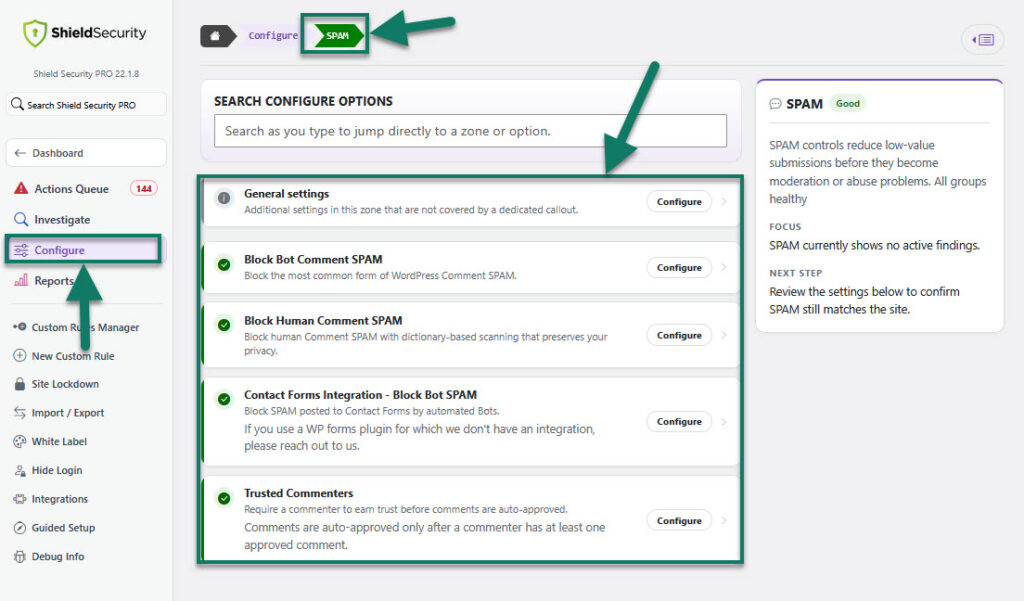
Beyond comment filtering, it includes firewall rules, login protection, file integrity monitoring, and bot detection.
Instead of relying on a single technique, ShieldPRO layers multiple protections. These include firewall rules, request rate controls, bot detection, and form hardening. As a result, spam is treated as part of your overall security posture rather than an isolated problem.
The dashboard centralises security events, so you see spam attempts alongside other threats like brute-force logins and blocked probes. This helps you understand whether spam is an isolated annoyance or part of a wider attack pattern.
The plugin operates independently without requiring mandatory external API subscriptions, and can optionally sync with Shield’s central network for enhanced detection if you enable it.
A guided setup wizard adjusts protection levels based on your site’s needs, making it accessible even if you don’t have deep technical experience.
For site owners who want spam prevention integrated into comprehensive security rather than bolted on separately, ShieldPRO consolidates what would otherwise require multiple plugins.

Best practices for spam prevention
Individual tools work better as part of a coherent strategy. These four practices form the foundation of reliable long-term spam protection:
- Comprehensive protection means layering built-in moderation with a dedicated anti-spam plugin rather than relying on either alone. Enable WordPress comment moderation as your baseline, then add a plugin like ShieldPRO or Antispam Bee to handle automated filtering. This way, anything the plugin misses still lands in your moderation queue instead of publishing automatically.
- Form protection deserves dedicated attention because contact forms and checkout pages are high-value spam targets. Choose form plugins with native anti-spam features. Test your forms regularly to ensure legitimate submissions still get through.
- Updates patch vulnerabilities that spammers exploit to bypass your defences. Enable automatic updates for WordPress core, or check for updates weekly and apply them promptly. Outdated plugins are a common entry point for spam injections that bypass frontend protections entirely.
- Web Application Firewalls (WAFs) block malicious traffic before it reaches WordPress, reducing server load and stopping attacks at the network edge. Cloudflare offers a free tier with basic WAF protection, while ShieldPRO includes firewall capabilities that work directly within WordPress. A WAF catches bot traffic that individual plugins might miss, especially coordinated attacks from botnets.
Why ShieldPRO is your best protection against spam
Earlier, we said that ShieldPRO works differently from traditional spam plugins. Now we’re going to show you exactly how:
- silentCAPTCHA scores visitors based on real interaction patterns without showing challenges. Unlike traditional CAPTCHAs, genuine users are never interrupted by checkboxes or image puzzles when submitting forms.
- Bot prevention analyses multiple behavioural and technical signals like JavaScript execution and interaction flow instead of just scanning message text. This goes beyond content-only spam filters, allowing ShieldPRO to spot automated tools even when their submissions look legitimate.
- Sitewide form protection applies the same anti-bot rules to comments, logins, registrations, WooCommerce checkouts, and major form plugins like WPForms. Rather than configuring separate anti-spam add-ons for each form type, you get consistent protection and policy in one place.
- CrowdSec integration is an optional threat-intelligence layer that uses patterns observed across many participating sites to block attacks preemptively. 58% of attacks to be precise.
- Rate limiting restricts how frequently a visitor can submit forms or trigger actions within a given timeframe. Unlike simple IP blocking or static rules, it automatically throttles spam floods and scripted attacks while letting normal user activity continue.
Protect your site from spam with ShieldPRO
WordPress spam prevention works best as a layered system that starts with free built-in Discussion settings (moderation, blocklists, disabling comments, login-required), then adds automated filtering via plugins, protects forms with honeypots and JavaScript tokens, and escalates to WAF-level blocking (like Cloudflare) for heavy attacks.
We’ve highlighted how different spam vectors – comments, registrations, checkouts, contact forms – need different defences, and that prevention tools aren’t a substitute for backups and recovery.
ShieldPRO stands out by consolidating spam protection into a broader security suite and stops bots before they submit. It uses privacy-first, on-site behavioural scoring through silentCAPTCHA and other anti-bot measures.
With sitewide coverage (including WooCommerce and major form plugins), plus rate limiting and CrowdSec intelligence, ShieldPRO delivers stronger protection without adding friction for real users.
Check out ShieldPRO today and stop spam before it ever reaches your site!