
Choosing between the free versions of Wordfence and MalCare requires looking beyond the feature lists. Instead, focus on understanding what each one actually does, what it doesn’t, and how those gaps affect your site’s uptime, performance, and long-term security costs.
The free version of Wordfence, officially called Wordfence Free, provides a full security stack, but with a 30-day delay on new firewall rules and malware signatures. MalCare’s free version scans for malware but doesn’t clean it, pushing all removals behind a paywall.
For many site owners, the question isn’t “Which plugin is better?” but “Which setup keeps my site fast, clean, and affordable?”
We’re taking a practical approach to both tools, using real outcomes such as scan load and cleanup delays. Expect to understand whether a free solution is enough for your site, when upgrading makes sense, and where alternatives like ShieldPRO work better.

Wordfence vs MalCare: What the free plans provide
The free versions of Wordfence and MalCare take two very different approaches to WordPress security.
Wordfence Free offers a full security stack: an endpoint firewall, malware scanning, malware removal, login protection, rate limiting, and two-factor authentication (2FA).
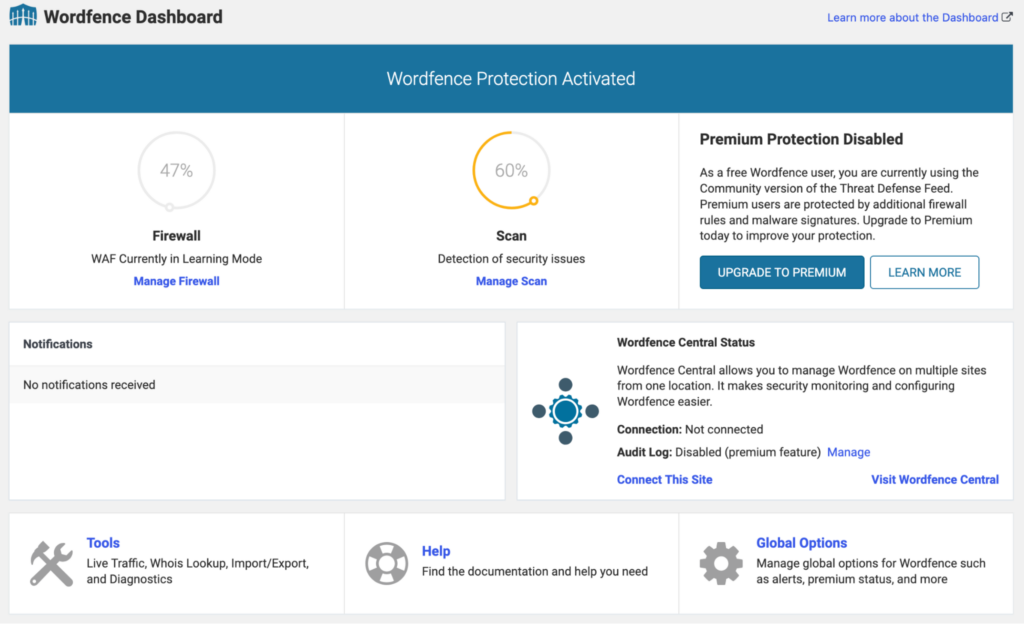
Its main limitation is the 30-day delay before new firewall rules and malware signatures are available to free users.
MalCare’s provides basic malware and vulnerability scanning.
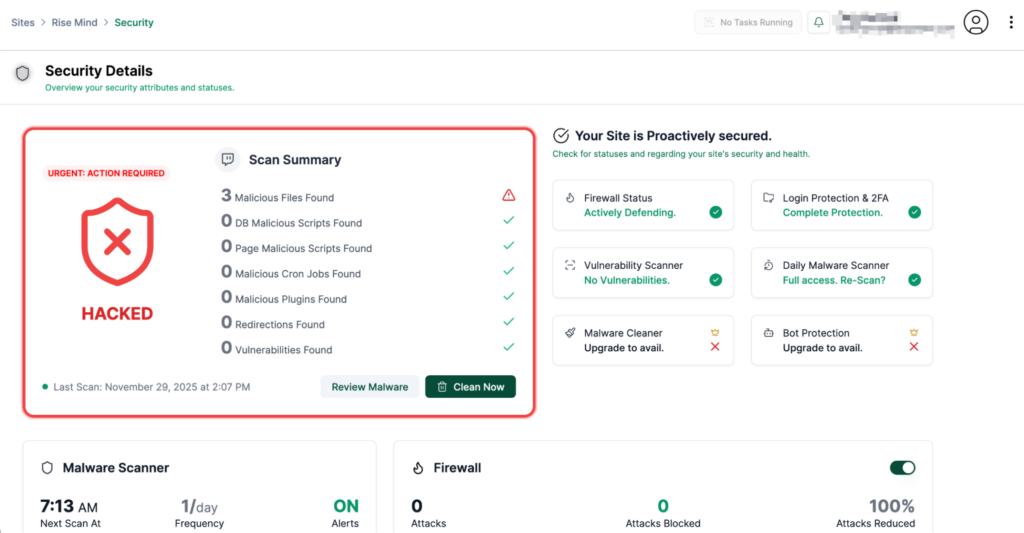
It also includes a cloud-based firewall and basic login protection, but advanced firewall rules and automated malware removal require a paid plan.
Free Wordfence works best for site owners who want broad protection without paying andcan accept the 30-day delay. It works well for low- to medium-risk sites when paired with Cloudflare and regular backups.
Free MalCare works best for users who only need lightweight off-server scanning, but it’s not suitable for those who need malware cleanup.
Performance impact
Wordfence scans and analyses files directly on your server using signature matching. This uses your hosting CPU and can slow down sites on shared or overloaded environments, especially during full scans. Many hosts warn about this, and some restrict or disable Wordfence on resource-limited plans.
So if you were wondering whether Wordfence slows down a website, the answer is yes.
The plugin itself isn’t slow, but server-side scanning and live traffic logging use measurable resources. On higher-tier hosting, this is rarely an issue; on budget shared hosting, though, it can trigger CPU limit warnings unless scans are scheduled for off-peak hours.
MalCare takes a different approach. It copies your site’s files to its own servers and scans them remotely. This removes almost all scanning load from your hosting account. The trade-off is that MalCare needs to transmit data off-site before it can analyse anything, which may add time to large scans but doesn’t significantly impact site speed for visitors.
When security scans fail to complete
Even with the performance differences clear, both security plugins can hit practical limits, and you’ll likely notice this when security scans fail to complete.
Failed scans usually come down to resource limits.
Wordfence relies on the server to process every file, so scans can stall or stop when PHP timeouts, memory limits, or CPU throttling occur. This is most common on shared hosting or on sites with large upload directories.
MalCare avoids most of these issues because the heavy scanning happens on their servers. However, failures can still occur if the plugin can’t reliably copy all files off-site, often due to firewall rules, missing PHP extensions, or unstable hosting I/O.
In a nutshell, Wordfence scan failures are more common on low-resource hosting because scanning occurs on the site’s server, whereas MalCare failures tend to stem from connectivity or file-copy issues.
In both cases, though, repeated scan failures indicate a hosting issue rather than a plugin bug. Adjusting scan schedules, excluding oversized directories, or upgrading hosting usually resolves the problem.
Cleanup capabilities and success rates
The biggest functional gap between the two free plans is clearest when a site gets infected.
Wordfence Free includes tools to repair or delete infected files, but cleanup requires manual review by the site owner.
Free MalCare, by contrast, does not remove malware at all. It will identify issues but pushes all cleaning behind a paid upgrade, meaning a compromised site cannot be restored using the free version.
Wordfence’s cleanup success depends on how complete its signature coverage is and whether the infection includes customised or obfuscated backdoors. It performs well with common malware but can miss database-level payloads, cron jobs, or modified plugins where the malicious code closely mimics legitimate files.
MalCare’s paid cleanup may not catch highly customised or hidden backdoors and may require manual follow-up.
Speed and accuracy of malware removal
Wordfence Free removes known malware immediately once a scan completes, but the 30-day signature delay affects how quickly it detects new threats. If the infection uses a variant not yet in the free signature set, detection and cleanup may be delayed. This is the main reason some reinfections persist.
Cleanup failures on both tools often stem from technical factors rather than the cleaner itself. Database entries can store malicious JavaScript, hidden admin accounts can recreate infected files, and compromised wp-cron tasks can re-download payloads after cleanup. File permissions and hosting restrictions can also block removal attempts.
In practice, simple file-based infections clean quickly with Wordfence Free. Complex infections – especially those involving the database or persistent backdoors – typically require manual review or a paid cleanup service, regardless of the plugin used.
Analysing the costs of MalCare vs Wordfence’s premium versions
Wordfence Premium is priced from $149 per site per year, and its main value is removing the 30-day delay on firewall rules and malware signatures. You also gain access to the real-time IP blocklist, country blocking, and priority support (for Care and Response tiers).
For site owners who stay on Wordfence Free, the key question is whether that delay creates meaningful risk. For many low-risk sites, it doesn’t – but for higher-traffic or business-critical sites, the real-time updates can justify the cost.
MalCare’s paid plans start at $99 per site per year, with higher tiers reaching over $499, depending on the features and site count. The upgrade unlocks automated malware removal, an advanced cloud firewall, bot protection, and more frequent scans.
Since the free version of MalCare doesn’t clean infections, the paid tier is effectively required if you want the plugin to restore a compromised site.
If you want a deeper comparison of premium features, we did a full breakdown in our dedicated MalCare vs Wordfence guide.
Meet ShieldPRO, the antifragile security solution
Where Wordfence and MalCare lean into the malware-hype obsession with detecting infections, ShieldPRO takes a prevention-first approach built on network-wide behavioural analysis.
Its MAL{ai} system learns from attacks across the entire Shield Security network, which has already blocked over 7.8 billion malicious IPs. Instead of waiting for updated signatures or offloading scans, ShieldPRO uses behaviour-driven patterns gathered from thousands of sites to identify and block threats earlier and with less load on your server.
All this makes it a strong option for site owners who want protection that improves over time without adding website performance overhead.
The extra security you get with ShieldPRO Plus
ShieldPRO’s Basic plan already delivers dependable protection for everyday sites, but the Plus plan builds on it with deeper recovery tools and stronger threat intelligence that make a clear difference on higher-value or busier installations.
For starters, it includes ShieldBACKUPS, which provides automatic daily backups with 7-day and 12-week retention, giving you reliable rollback options without relying on your host.
You also gain access to advanced CrowdSec IP blocklists, expanding collective defence with broader threat intelligence.
Plus adds WP-Config tamper protection, which blocks one of the most common post-infection modification points, and automatic file repair, allowing the plugin to restore altered core files without manual intervention.
It also includes protection for premium plugins and themes, which are frequent targets due to outdated or unpatched versions.
Skip the compromises with ShieldPRO
The free versions of Wordfence and MalCare cover different needs, and the right choice depends on how much risk your site can tolerate and how much performance headroom your hosting provides.
Wordfence Free offers comprehensive on-site protection but can be heavy on shared servers. Free MalCare keeps performance light but requires a paid plan to clean infections. Both can work well when paired with sensible layers, such as backups and strict login security.
If you want a security approach that adapts to real-world threats and reduces the chance of repeat cleanups, ShieldPRO offers a balanced alternative. Its collective intelligence, lightweight design, and recovery-focused features help keep sites stable without the usual overhead.
Check out ShieldPRO today and see how it fits your setup.