What’s Happened
Today, 21 October, PHP is releasing an emergency security update for two critical vulnerabilities, both rated 9.2 out of 10.
PHP is the software that runs WordPress, so this affects practically every WordPress site.
Researchers report the flaws let an attacker run code on your server without logging in. Details leaked before the fix was ready, and attacks are expected as soon as the update is published.
No WordPress plugin can stop this, Shield included. The attack hits PHP before WordPress loads. The fix must come from your host.
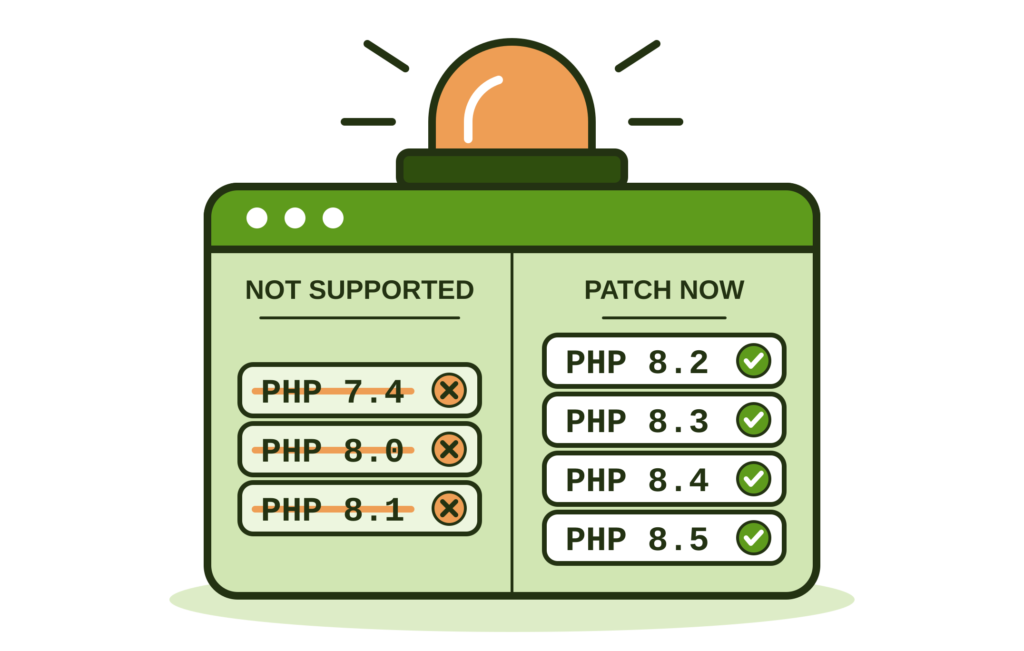
PHP 7.4, 8.0 and 8.1 Will Never Be Fixed
Only PHP 8.2+ get new security fixes. If your site runs 7.4, 8.0 or 8.1, it stays vulnerable to these flaws, and every future one.
You need to upgrade to PHP 8.2 or higher, ASAP (see below).
Check Your PHP Version
In your WordPress dashboard, go to Tools > Site Health > Info > Server and find PHP version.
- 7.4, 8.0 or 8.1: upgrade to PHP 8.2 or newer, urgently.
- 8.2 or newer: make sure your host installs today’s patch. These versions are vulnerable:
- PHP 8.5.11 or earlier
- PHP 8.4.26 or earlier
- PHP 8.3.35 or earlier
- PHP 8.2.34 or earlier
Contact Your Host Today
Your host controls PHP. Don’t assume they’ll patch automatically. Send them this:
Hi, PHP is releasing an emergency security update today (21 October 2026). My site runs PHP [your version]. When will my site get the patched release? Until then, please set
session.upload_progress.enabled = 0for my site.
That last line is a stopgap. Researchers report it blocks only 1 of the 2 vulnerabilities, not both. PHP hasn’t confirmed it. Turning it off won’t break a normal WordPress site. It buys time, but it doesn’t replace the patch.
Applying the Stopgap Yourself
If you can edit files on your hosting, add this line:
session.upload_progress.enabled = 0- Your own server: add it to
php.ini, then restart PHP. - Shared hosting: add it to a file named
.user.iniin your site’s main folder (wherewp-config.phplives). Create the file if it doesn’t exist. It can take up to 5 minutes to apply.
(Check with your hosting provider on how to edit your php.ini and whether .user.ini files are supported.)
To check it worked:
- Create a file named
phpinfo.phpin the same folder, containing only<?php phpinfo(); - Open
yoursite.com/phpinfo.phpin your browser and search the page forsession.upload_progress.enabled. The first column (Local Value) should show Off. - Delete
phpinfo.phpstraight away. It exposes details about your server.
If it still shows On after 5 minutes, your hosting doesn’t read .user.ini. Ask your host to apply it.
What If Your Host Doesn’t Respond?
Switch hosts. A host that’s slow to patch a critical PHP flaw is putting your site at risk. As we’ve said before, never be afraid to switch service providers.
Choose a host that patches PHP promptly and tells you when it has. Our WordPress migration checklist walks you through the move. Until then, apply the stopgap yourself.
On 7.4, 8.0 or 8.1? Upgrade
No patch exists for these versions, so upgrading is your only fix. Follow our PHP upgrade guide. In short:
- Back up your site.
- Update WordPress, your plugins and your theme.
- Switch to PHP 8.3 or 8.4 (8.2 at minimum) in your hosting control panel.
- Check your site. If anything breaks, switch back and see the guide for fixes.
Shield Is Also Moving to PHP 8.2
As we outlined several months ago, this situation with software security is only going to intensify. This is why Shield’s next major release will require PHP 8.2 or newer. Shield 22.3 will be the last release to support PHP 7.4.
Check your PHP version and contact your host today.
Any questions? Leave a comment below.