ShieldPRO 22.0 is one of our most significant releases in years, built around a complete rethink of how Shield presents information to you — not what it monitors or detects, but how it guides you through the work of actually responding to it. Alongside that, silentCAPTCHA gets a meaningful upgrade to its underlying challenge system. Read on to discover everything that’s new and improved.
For further details on all changes, we recommend reviewing the Upgrade Guide that accompanies this release (as for all major releases).
#1 If Everything Is Important, Nothing Is
One of the hardest problems in security tooling is information overload. Shield monitors a lot — traffic, files, users, bots, scans, configurations — and historically, it showed you most of that in a relatively flat way.
The result was that a critical file integrity issue could sit alongside a routine informational log entry. It wasn’t always obvious what needed your attention right now versus what was simply there for reference.
22.0 addresses this directly. The plugin has been restructured around four focused workspaces, each with a clear purpose. Instead of wading through a single view and deciding for yourself what matters, Shield now does that triage for you.
- Actions Queue — what needs your attention and when.
- Investigate — dedicated views for digging into users, IPs, files, traffic, and more.
- Configure — your security coverage, weak settings, and next steps in one place.
- Reports — clearer summaries, trend charts, and report management.
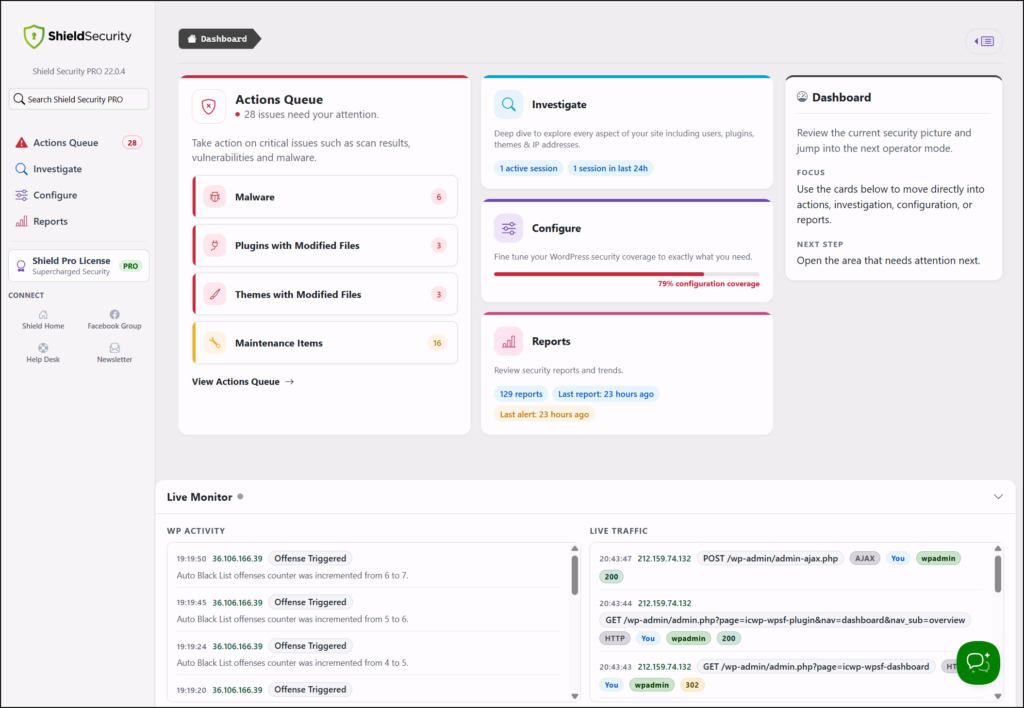
Actions Queue
The Actions Queue tells you what needs to be dealt with immediately, and what can wait. Critical issues are separated from lower-priority warnings you can work through when you have time. Scan findings, File Locker items, maintenance tasks, and quick actions are all collected here — so you’re not left hunting across multiple screens and tools trying to piece together what’s actually wrong.
The WordPress dashboard widget reflects the same priority items as the Actions Queue, so you can see where things stand without even opening Shield.
Investigate
When an IP is behaving suspiciously, a user account looks compromised, or a plugin file has changed unexpectedly, Investigate gives you dedicated views for users, IPs, plugins, themes, core files, live traffic, and sessions. You go straight to what you’re looking for rather than filtering a general log.
IP analysis in particular now shows more at a glance — clearer summaries, identity details, and the actions you actually need in that context.
Configure
Configure pulls your security coverage, weak settings, and recommended next steps into one place. There’s also an in-place search so you can find and open settings directly without losing where you were.
Reports
Reports now has its own dedicated workspace with clearer summaries and cleaner report management. We’ve also added custom stat charts so you can visualise your security data — traffic trends, block rates, scan results — rather than reading through tables of numbers. The charts are available to all members.
#2 Alerts and Reports Are Now Properly Separate
Alerts and reports serve completely different purposes — but until now, Shield didn’t treat them that way.
An alert exists to tell you something has happened that needs your attention. A report exists to give you a picture of how your site has been performing over time. Receiving both through the same mechanism, with the same visual weight, means that over time you start to tune out.
In 22.0, the two are clearly distinguished in both content and delivery. If you’ve ever found yourself skimming a Shield email and wondering whether it actually needed your attention, this is the fix for that.
#3 silentCAPTCHA v3 – Stronger Bot Challenges
silentCAPTCHA is Shield’s bot detection system — it stops malicious bots from abusing your login forms, contact forms, registrations, and checkouts without ever asking real visitors to solve a puzzle or click a grid of traffic lights. We’ve been building and refining it across several releases, and 22.0 brings a significant upgrade to the challenge mechanism that runs behind the scenes.
Until now, silentCAPTCHA used a hash-based proof-of-work challenge — the bot’s browser had to find a number whose SHA hash matched a specific target. That’s a well-established approach, but modern GPUs can chew through simple hash comparisons very quickly, which limits how much protection it can realistically provide.
silentCAPTCHA v3 moves to the altcha-lib v2 protocol, which replaces hash-matching with PBKDF2-based key derivation. Instead of finding a matching hash, the bot must find a counter value whose derived key starts with a required prefix — a fundamentally harder problem that’s much more resistant to GPU acceleration.
The number of iterations is configurable. Adaptive mode will balance protection strength against the performance of your visitors’ devices automatically.
None of this is visible to real visitors. They still don’t see challenges, puzzles, or prompts. The heavier work happens in the background — bots just find it a great deal harder to pass.
#4 Other Improvements & Fixes
We’ve also made the following improvements and fixes in 22.0.
-
- Live activity feed — The dashboard now shows a live feed of what’s happening on your site while you work, with traffic and live logs showing more useful detail about each request. Routine admin noise like AJAX and heartbeat traffic is filtered out, and the log retention policy has been updated: less useful logs are cleared sooner, more useful events are kept longer.
-
- Scan handling — Scans are faster and more reliable, particularly on larger sites. Scan result pages retain more context while you work through findings, and Shield is better at recognising when scan queues have finished, which reduces stuck or incomplete scan states.
-
- Safer admin action prompts — Sensitive admin actions now use clearer confirmation prompts so it’s easier to understand what will happen before you continue.
-
- Keyboard navigation and admin dialogs — Keyboard focus is clearer and more consistent across Shield admin pages, tables, settings, dialogs, and MFA controls. Messages, confirmations, and error prompts are easier to follow with keyboard navigation and screen readers.
-
- MainWP site actions — MainWP site action controls are more reliable and easier to use, including with keyboard navigation. Common site management actions from MainWP now feel more consistent with the rest of Shield.
-
- 2FA and passkey upgrades — The 2FA verification portal is cleaner and easier to use. Existing passkeys are handled more reliably during upgrades, so registered passkey logins keep working after Shield updates.
-
- PHP 8.4 support — Reduces PHP 8.4 deprecation warnings on sites running newer PHP versions.
-
- Release stability — Automated tests and checks catch more issues before release.
Where Are All My Tools?
Everything you relied on before is still there. The restructure is about how Shield organises and presents your security work — not a removal of tools. Here’s where to find them.
Under Investigate:
-
- WP Activity Log
-
- Request Log
-
- User Sessions
Under Configure:
-
- Custom Rules Builder
-
- Lockdown
-
- Import & Export
-
- Whitelabel
Comments & Suggestions
For the full list of changes, we suggest you review the changelog for the plugin.
As always, we welcome any feedback you may have. Please leave any comments below and we’ll get right back to you!